Extra- Curricular Activities

Set up after school sports registrations, arts and crafts/ minSet up after school sports registrations, arts and crafts, mini courses, night courses, holiday programmes, itinerant music lessons and much more. Students browse what is on offer, pick what they want, and their caregivers approve and pay for it in one place.i courses, night courses, holiday courses, itinerant music lessons, and much more using this feature. It is online course selection made simple without the rules involved in standard school course selection.

Everything is named to suit your school. If you call them activities, programmes, clubs or lessons, the whole module follows your wording.

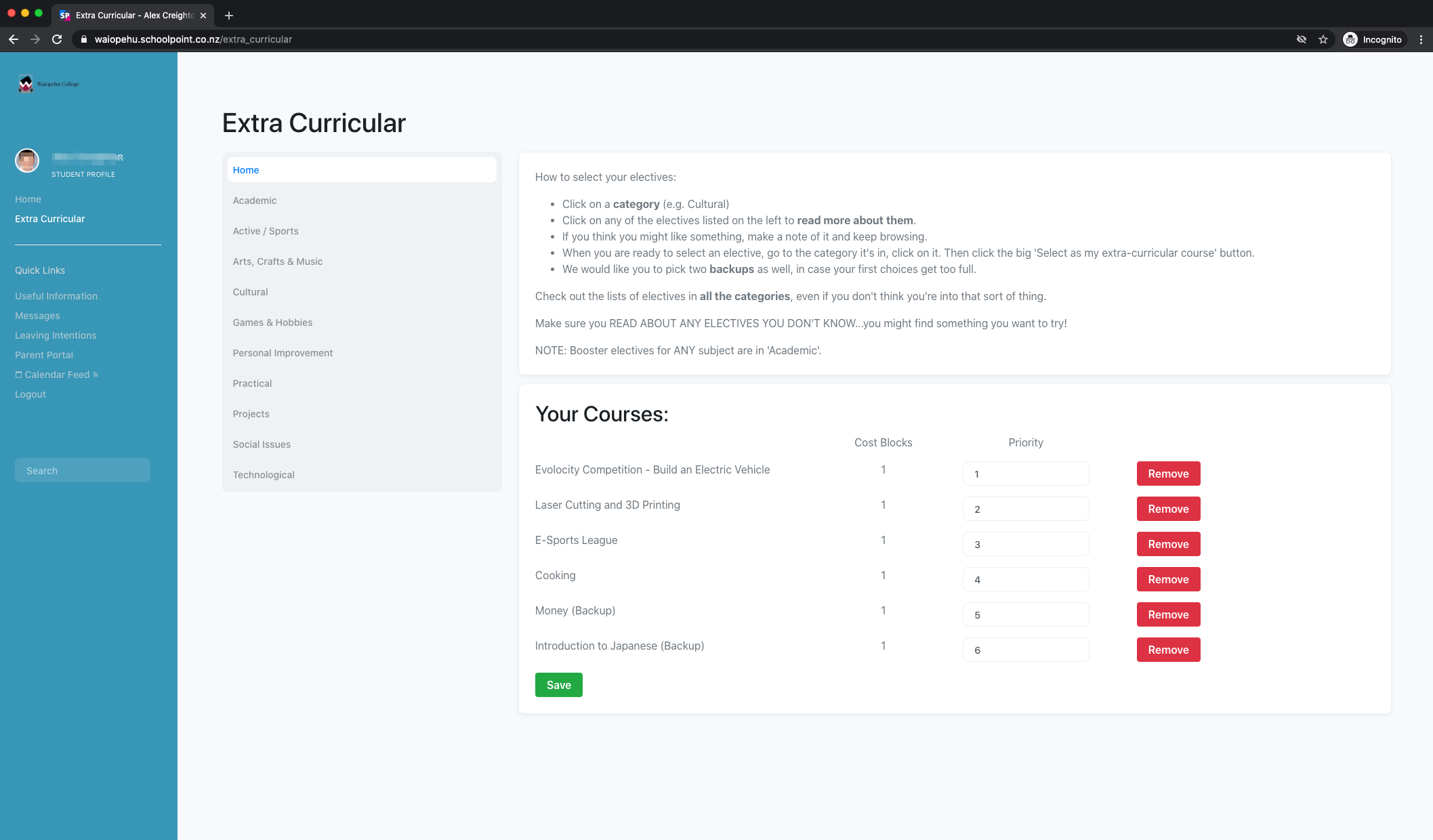
Students see only what they can actually do

A simple, visual list of everything they are eligible for, grouped the way your school organises it - Summer Sport, Performing Arts, Itinerant Music - with your own introduction at the top explaining how selections work this year.

  • Browse by learning area, or search every activity by name.
  • Open an activity for the full description, the cost, where it runs, who is in charge, and any external sign-up link.
  • Select what they want, and rank their choices if your school allows priorities.
  • Give a reason for choosing an activity, where you require one.
  • See at a glance what is selected, approved, still to pay, and confirmed.
  • Print a receipt for anything they have paid.
Caregiver Payments

One payment, every child, everything they owe

A simple, visual list of everything they are eligible for, grouped the way your school organises it - Summer Sport, Performing Arts, Itinerant Music - with your own introduction at the top explaining how selections work this year.

  • Browse by learning area, or search every activity by name.
  • Open an activity for the full description, the cost, where it runs, who is in charge, and any external sign-up link.
  • Select what they want, and rank their choices if your school allows priorities.
  • Give a reason for choosing an activity, where you require one.
  • See at a glance what is selected, approved, still to pay, and confirmed.
  • Print a receipt for anything they have paid.
Caregiver Approval

Nothing is confirmed until the family signs it off

  • Caregivers approve or decline each selection, and can leave a note explaining why.
  • Staff see who approved what, and when.
  • An activity with a cost is only fully approved once it has been paid, so approval and payment can never drift apart.
  • Paying approves the selection automatically — families are not asked to confirm the same thing twice.

Staff Approval and Control

Work from the student, or from the activity

  • Open any student and see everything they have selected, with approval and payment status in one list.
  • Add a selection on a student's behalf, move it between blocks, or remove it.
  • Approve for a caregiver who has confirmed by phone or at the office.
  • Open any activity and see every student in it, with year level, tutor class, approval and payment.
  • Lock a selection so it can no longer be changed — or lock a whole activity in one action once numbers are settled.
  • Waive or restore a fee for an individual student.
  • Teachers in charge get their own view of just their activities, with current numbers.

None of this touches your standard course selection. Extra-curricular runs on its own rules, so a busy sports sign-up or music lesson registration cannot interfere with the timetable.

Setting Up

Built around how your school already talks

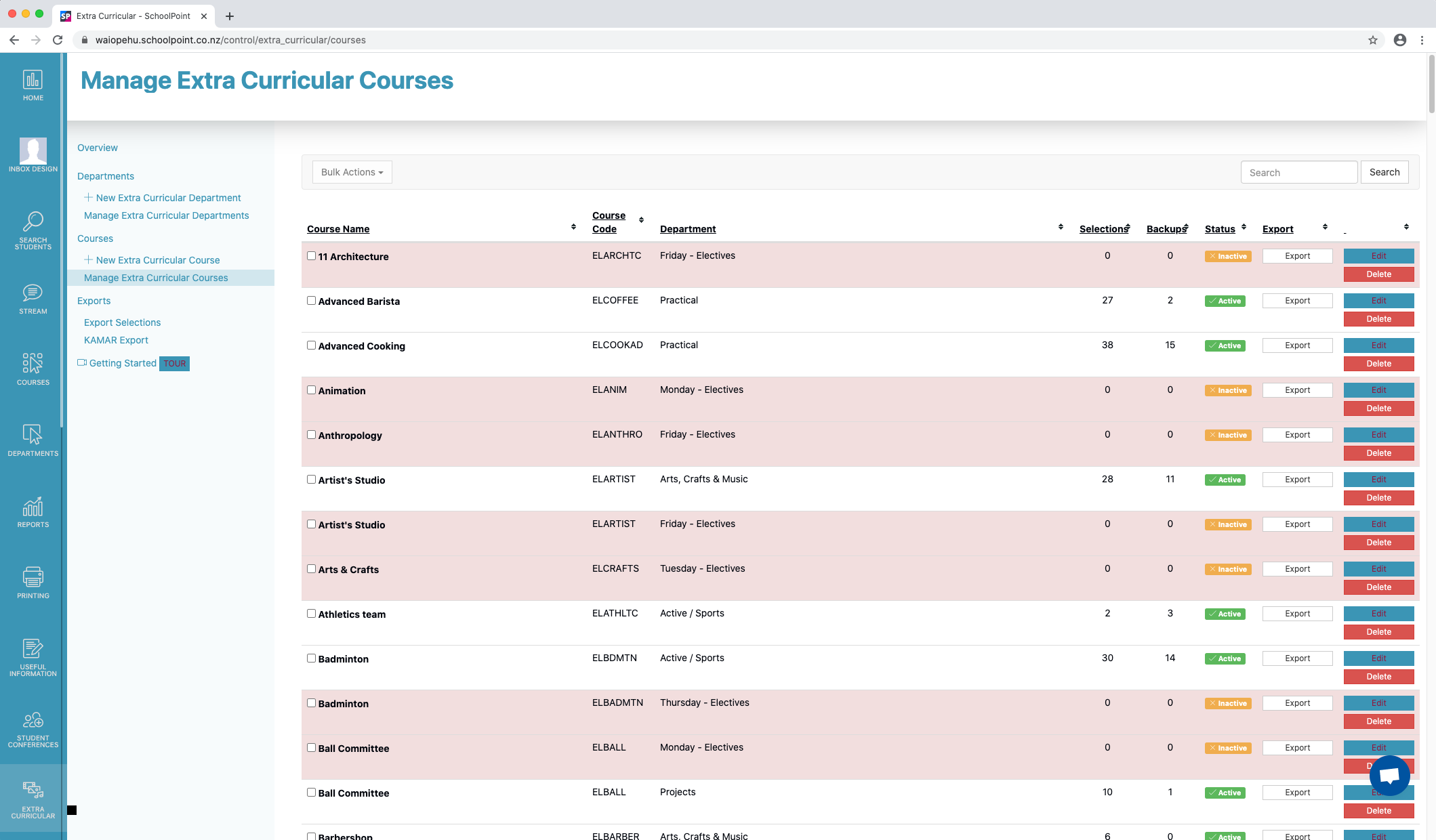
  • Group activities into learning areas that match your own structure, each with its own description and requirements.
  • Give every activity a name, code, description, image, location and cost.
  • Name the teacher in charge, so students and caregivers know who to ask.
  • Add an external link for anything needing a form, a uniform order or an outside registration.
  • Mark activities active, inactive or archived as the year moves on.

Reports and Exports

A spreadsheet for whoever needs one

Ready for a coach, a caretaker, a treasurer, or your student management system.

  • Current year selections and every year on record.
  • Full detail list with tutor class, house and whānau.
  • Locked and unlocked selections, to see what is still open to change.
  • Students with no selections — the chase-up list.
  • Payments — charged, paid, waived and still owing.
  • Activity details — status, limits, year levels, teachers in charge.
  • Timetable exports in the columns KAMAR expects.